

Introduction
Writing code is no longer just about sitting in an editor and typing every line yourself.
AI coding tools can now help developers understand unfamiliar codebases, generate features, fix bugs, refactor existing code, write tests, review changes, and even work through multi-step development tasks.
But there is a problem.
There are now so many AI coding tools that choosing the right one can be harder than using one.
Some tools are designed to feel like an AI-first code editor. Others work primarily from the terminal. Some give you access to multiple AI models, while others are closely connected to a specific ecosystem.
And the best tool for a beginner is not necessarily the best tool for an experienced developer.
In this guide, we’ll look at 7 AI coding tools worth trying in 2026: Cursor, Claude Code, OpenAI Codex, Cline, Aider, Amazon Q Developer, and Kiro.
You’ll learn what each tool does, who it is best for, real-world ways to use it, pricing, advantages, limitations, and which tool makes the most sense for your workflow.
Quick answer: Cursor is one of the strongest all-around choices for developers who want an AI-first coding environment. Claude Code is particularly interesting for terminal-based and complex coding work, Codex is a strong choice for developers already using ChatGPT, Cline is ideal for flexibility and model choice, Aider is excellent for terminal and Git workflows, Amazon Q Developer is especially relevant to AWS developers, and Kiro stands out for developers who prefer a more structured, specification-driven approach.
What Are AI Coding Tools?
An AI coding tool is software that uses artificial intelligence to help with software development.
Traditional coding generally looks like this:
You understand the problem → write the code → run it → find errors → fix them → test again
AI-assisted development can change that workflow:
You describe the goal → AI analyzes the code → generates or changes code → you review it → run tests → refine the result
The important difference is that modern AI coding tools are moving beyond simple autocomplete.
For example, instead of asking an AI to generate one function, you might ask it to:
- Understand an existing project
- Find where a feature should be implemented
- Modify several files
- Create tests
- Run commands
- Identify errors
- Fix problems
- Explain the changes
- Prepare a commit or pull request
The exact capabilities depend on the tool.
That distinction matters because AI coding assistants are not all built for the same kind of developer.
Some are best for autocomplete and everyday coding.
Others are closer to coding agents that can work through larger tasks with less step-by-step instruction.
What Can AI Coding Tools Actually Do?
Depending on the platform, AI coding tools can help with:
- Code generation
- Code completion
- Debugging
- Refactoring
- Test generation
- Documentation
- Code explanation
- Code review
- Repository exploration
- Feature development
- API integration
- Database work
- Terminal commands
- Git workflows
- Migration tasks
- Security analysis
- Multi-file changes
- Agentic software development
But the important question isn’t simply:
“Which AI coding tool has the most features?”
A better question is:
“What kind of coding work do I actually want AI to help me with?”
That question will make choosing a tool much easier.
1. Cursor — Best Overall AI Coding Tool
Cursor is one of the most recognizable AI-first coding environments available in 2026.
Rather than simply adding an AI assistant to a traditional editor, Cursor is designed around AI-assisted development from the beginning.
It can help you work with an existing codebase, generate code, edit multiple files, use different models, and handle agent-style development tasks.
Its current paid plans include access to frontier models, Agent capabilities, MCPs, skills, hooks, cloud agents, and Bugbot.
![Cursor AI coding interface]
What problem does Cursor solve?
Cursor is particularly useful when your problem is:
“I want an AI coding environment that can understand my project and help me build things faster.”
For example, imagine you have a web application with dozens of files.
Instead of manually searching through the project to find where a feature belongs, you can ask the AI to understand the relevant parts of the codebase and help implement the change.
That can make larger development tasks much easier to approach.

Who is Cursor best for?
Cursor is a good fit for:
- Beginners learning modern AI-assisted development
- Web developers
- Freelancers
- Startup developers
- Full-stack developers
- Developers working on existing codebases
- Developers who want multiple AI models
- Developers interested in agentic coding
Real-world examples
If you’re building a website:
You could ask Cursor to create a responsive component, connect it to an API, and help update the related files.
If you’re debugging:
You could provide the error and ask Cursor to investigate the relevant code and suggest a fix.
If you’re working on an existing application:
Cursor can help explain unfamiliar files and identify where a particular feature is implemented.
If you’re refactoring:
You can ask it to update related sections of a project rather than manually changing every file yourself.
Pricing
Cursor currently offers a Free Hobby plan with limited Agent requests.
The individual Pro plan starts at $20/month, while Pro+ is $60/month and Ultra is $200/month. Cursor also offers team plans.
One important point is that Cursor’s usage isn’t simply about the subscription price. Different AI models consume usage at different rates, and additional on-demand usage can apply after included usage is exhausted.
Advantages
- AI-first development environment
- Strong agentic coding capabilities
- Multiple AI models
- Excellent for working with existing projects
- Supports MCPs, skills, and hooks
- Cloud agent capabilities
- Beginner-friendly compared with many terminal-first tools
Limitations
- Heavy agent usage can increase costs
- Developers still need to review generated code
- Complex projects can require careful prompting
- The number of available features can feel overwhelming at first
Best choice if:
You want an AI-first coding environment that combines an editor, multiple models, and agentic development in one place.
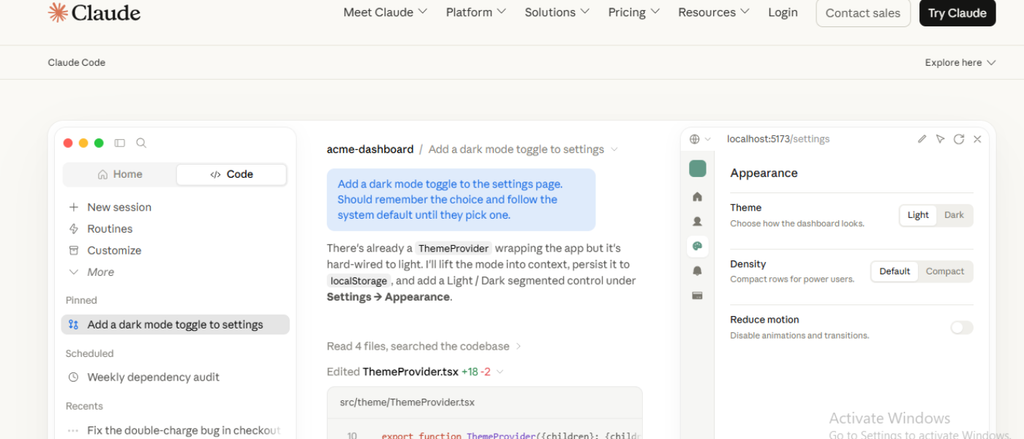
2. Claude Code — Best for Complex Coding Tasks
Claude Code takes a different approach.
Instead of making the editor itself the center of the experience, Claude Code is strongly associated with working from the terminal and giving an AI coding agent access to the development environment.
It can be useful for developers who want to work through larger coding tasks rather than simply asking for individual snippets.
Anthropic describes Claude Code as a coding agent that can be used throughout the development lifecycle, and its business offerings integrate Claude Code into Team and Enterprise workflows.
What problem does Claude Code solve?
Its main use case is:
“I want an AI agent that can work through complex development tasks with me rather than only completing individual lines of code.”
That makes it particularly interesting for developers who are comfortable with the terminal.
Who is Claude Code best for?
- Experienced developers
- Terminal-focused developers
- Backend developers
- Full-stack developers
- Developers working with large codebases
- Developers handling complex refactoring
- Teams experimenting with agentic development
Real-world examples
If you’re debugging a large project:
Claude Code can help investigate related files and reason through the problem instead of focusing on one code snippet.
If you’re adding a feature:
You can describe the desired behavior and allow the agent to work through multiple development steps.
If you’re refactoring:
It can help identify related parts of a codebase that need to change.
If you’re learning a new repository:
You can ask questions about the project structure and how different components work together.
Pricing
Claude Code availability depends on the Claude plan or API setup you use, and usage can vary depending on how much coding work you perform.
Anthropic has also expanded Claude Code availability for business users through premium seats, while Claude models can also be accessed through API-based usage.
For developers who use the API, model usage is billed according to the applicable model pricing.
Advantages
- Strong reasoning for complex coding tasks
- Excellent terminal-oriented workflow
- Useful for large development tasks
- Good repository understanding
- Can work beyond simple autocomplete
- Strong fit for experienced developers
Limitations
- Less beginner-friendly than a traditional visual editor
- Terminal workflows can take time to learn
- Usage costs can vary depending on workload
- Developers still need to review and test changes
Best choice if:
You are comfortable with the terminal and want an AI coding agent for larger, more complex development tasks.
3. OpenAI Codex — Best for AI Agent-Based Development
OpenAI Codex is OpenAI’s coding agent designed to help developers write, review, and ship code.
Codex has increasingly moved beyond simple code generation.
It can work on coding tasks, refactoring, migrations, pull requests, and longer-running development work. OpenAI describes Codex as an agent designed to handle engineering work end to end.
Codex is also available across ChatGPT plans, including Free and Go, although usage limits vary by plan.
What problem does Codex solve?
Codex is useful when your problem is:
“I want an AI coding agent that can take a development task and work through it rather than only giving me an answer.”
This makes it particularly interesting for developers who already use ChatGPT.
Who is Codex best for?
- ChatGPT users
- Developers interested in coding agents
- Software engineers
- Developers managing multiple projects
- Teams experimenting with AI-assisted engineering
- Developers working on repetitive engineering tasks
Real-world examples
For a new feature:
You can give Codex a task and have it work through implementation steps.
For refactoring:
Codex can help modify existing code while preserving the broader project context.
For code review:
You can use it to inspect changes and identify potential issues.
For maintenance:
AI agents can be used for repetitive engineering work such as issue triage, monitoring, and other development tasks. OpenAI specifically highlights these background-work capabilities for Codex.
Pricing
Codex is included across ChatGPT plans, including Free and Go, with usage limits depending on the plan. Higher-usage options are also available through applicable ChatGPT plans and business offerings.
The important thing is to check your ChatGPT plan’s current Codex limits before relying on it for heavy development work.
Advantages
- Strong agent-based workflow
- Works across different development environments
- Included with ChatGPT plans
- Useful for larger engineering tasks
- Good for code review and refactoring
- Can support longer-running tasks
Limitations
- Usage limits depend on your plan
- Complex tasks still require human review
- Heavy usage may require a higher plan
- Not every project should be handed completely to an AI agent
Best choice if:
You already use ChatGPT and want to add an AI coding agent to your development workflow.
4. Cline — Best for Flexibility and Model Choice
Cline is an open-source AI coding agent designed for developers who want more control over the models and providers they use.
This is where Cline becomes particularly interesting.
Instead of locking you into one AI provider, Cline supports multiple providers and allows developers to bring their own API keys.
Cline’s individual open-source version is free, with users paying for AI inference rather than a traditional subscription.
What problem does Cline solve?
Cline is useful when your problem is:
“I want an AI coding agent, but I don’t want to be locked into one AI model or subscription.”
That flexibility can be valuable for developers who want to compare models or control their AI costs.
Who is Cline best for?
- Developers
- Technical users
- Open-source enthusiasts
- AI developers
- Developers who want model flexibility
- Users comfortable with API keys
- Developers who want more control over AI spending
Real-world examples
If you want to compare models:
You can use different supported providers rather than being restricted to a single model ecosystem.
If you’re working on a large project:
Cline can help inspect files, make changes, and work through development tasks.
If you’re building AI workflows:
MCP support can help connect the coding agent to additional tools and services.
If you care about cost control:
Using your own API keys can give you more direct control over which provider you pay for.
Pricing
Cline’s open-source version is free for individual developers.
Instead of paying a required monthly subscription, you pay for AI inference based on the models and providers you use. Cline also supports bringing your own API keys.
Advantages
- Open source
- Free software for individual developers
- BYOK support
- Multiple AI providers
- No mandatory subscription
- MCP Marketplace
- VS Code extension and CLI
- Strong flexibility
Limitations
- Requires more technical understanding
- API-based pricing can be confusing
- You are responsible for managing model usage
- Less straightforward for complete beginners
Best choice if:
You want maximum flexibility over AI models, providers, and costs.
5. Aider — Best for Terminal and Git Workflows
Aider takes a more lightweight approach to AI-assisted programming.
Rather than trying to become a complete AI-first IDE, Aider focuses heavily on working with your existing development environment, terminal, and Git workflow.
That makes it particularly attractive to developers who already prefer command-line tools.
What problem does Aider solve?
Aider is useful when your problem is:
“I want AI assistance directly inside my coding workflow without replacing the tools I already use.”
Instead of moving everything into a new environment, you can integrate AI into an existing terminal-based development process.
Who is Aider best for?
- Experienced developers
- Terminal users
- Git users
- Open-source developers
- Developers who prefer lightweight tools
- Developers who don’t want a full AI IDE
Real-world examples
If you’re fixing a bug:
You can ask Aider to help modify the relevant files and then inspect the resulting Git changes.
If you’re adding a small feature:
You can describe what you want and have the tool help implement the change.
If you’re working with Git:
The workflow fits naturally with version control, making it easier to review what changed.
If you prefer the command line:
You don’t need to abandon your existing terminal-centered workflow.
Pricing
Aider itself is open-source, but the AI models it uses can have their own costs.
Your actual expense therefore depends on the model provider and API you choose.
This can be an advantage for developers who want control over their model selection, but it also means you need to understand API pricing.
Advantages
- Open-source approach
- Terminal-first workflow
- Strong Git integration
- Lightweight
- Flexible model selection
- Good for experienced developers
Limitations
- Less beginner-friendly
- Terminal knowledge is useful
- AI model costs are separate
- Not designed to replace a full visual IDE
Best choice if:
You prefer the terminal, Git, and a lightweight AI-assisted coding workflow.
6. Amazon Q Developer — Best for AWS Developers
Amazon Q Developer is designed around software development with a strong connection to the AWS ecosystem.
It can help developers understand AWS services, generate and update code, review code, scan for security issues, and work inside supported development environments.
What problem does Amazon Q Developer solve?
Its strongest use case is:
“I build software using AWS and want AI assistance that understands the AWS ecosystem.”
For developers deeply involved with AWS, that context can be more valuable than simply choosing a general-purpose coding assistant.
Who is Amazon Q Developer best for?
- AWS developers
- Cloud engineers
- Backend developers
- DevOps teams
- Developers working with AWS services
- Teams concerned with code security and cloud infrastructure
Real-world examples
If you’re building an AWS application:
Amazon Q can help answer questions about AWS services and assist with implementation.
If you’re debugging:
It can help investigate problems in code and AWS-related configurations.
If you’re reviewing code:
Amazon Q provides code-review capabilities focused on code quality and security issues.
If you’re modernizing applications:
Amazon Q has capabilities for certain code transformation and migration tasks, including Java and .NET workflows.
Pricing
Amazon Q Developer has a Free Tier with 50 agentic requests per month.
The Pro Tier is $19 per user per month and provides higher limits and additional capabilities.
There is an important 2026 consideration, however.
AWS has announced that Amazon Q Developer IDE plugins will reach end of support on April 30, 2027, and AWS recommends Kiro for similar IDE capabilities.
That means Amazon Q Developer is still relevant, particularly for AWS-related development, but developers choosing an AI IDE for the longer term should also evaluate Kiro.
Advantages
- Strong AWS integration
- Free tier
- $19/month Pro plan
- Code generation
- Code review
- Security capabilities
- AWS-focused assistance
- IDE and CLI support
Limitations
- Strongest value is within the AWS ecosystem
- Product direction is changing
- IDE plugin support ends in 2027
- Developers may want to evaluate Kiro for future IDE workflows
Best choice if:
You work heavily with AWS and want AI assistance that understands cloud development and AWS services.
7. Kiro — Best for Spec-Driven Development
Kiro is particularly interesting because it takes a more structured approach to AI-assisted development.
Instead of simply saying:
“Build this feature.”
Kiro encourages developers to work from clearer requirements, specifications, and development steps.
This approach is designed to make AI-assisted development more structured and predictable.
What problem does Kiro solve?
Kiro is useful when your problem is:
“I want AI to help build software, but I also want a structured process instead of simply generating code from vague prompts.”
That distinction can become important as AI coding agents take on larger tasks.
Who is Kiro best for?
- Developers building larger applications
- Software teams
- Developers who prefer structured workflows
- AWS developers
- Developers interested in agentic IDEs
- Teams that want clearer requirements before implementation
Real-world examples
If you’re building a new application:
You can begin by defining what the application needs to do before asking the AI to implement everything.
If you’re working with a team:
A specification-driven workflow can make requirements easier to communicate.
If you’re building a complex feature:
Breaking the work into requirements, design decisions, tasks, and implementation can reduce ambiguity.
If you’re moving from Amazon Q Developer:
AWS specifically recommends Kiro as the direction for similar IDE capabilities as Amazon Q Developer’s IDE plugins approach end of support.
Pricing
Kiro currently offers:
- Free — $0/month: 50 credits
- Pro — $20/month: 1,000 credits
- Pro+ — $40/month: 2,000 credits
- Pro Max — $100/month: 5,000 credits
- Power — $200/month: 10,000 credits
Paid plans can also purchase additional credits at $0.04 per credit.
Advantages
- Structured development workflow
- Specification-driven approach
- Agentic development
- Strong connection to AWS’s developer tooling direction
- Free plan available
- Multiple pricing tiers
- Useful for larger projects
Limitations
- More structured than some developers may want
- Credit-based pricing requires monitoring
- Advanced plans can become expensive
- May take time to understand if you’re used to simple autocomplete tools
Best choice if:
You want AI-assisted development with more structure, planning, and specification before implementation.
| Cursor | Claude Code | OpenAI Codex |
|---|---|---|
| Best For: Overall AI Coding | Best For: Complex Coding Tasks | Best For: AI Agent-Based Development |
| Ease of Use: ⭐⭐⭐⭐⭐ | Ease of Use: ⭐⭐⭐⭐ | Ease of Use: ⭐⭐⭐⭐ |
| Starting Price: Free / $20 mo. | Starting Price: Paid plan / API | Starting Price: Included with eligible ChatGPT plans |
| Biggest Strength: AI-first coding environment | Biggest Strength: Deep codebase reasoning | Biggest Strength: Autonomous coding agents |
| Main Limitation: Can become expensive with heavy usage | Main Limitation: Terminal-first workflow takes learning | Main Limitation: Usage limits depend on plan |
| Cline | Aider | Amazon Q Developer |
|---|---|---|
| Best For: Flexibility & Model Choice | Best For: Terminal & Git Workflows | Best For: AWS Developers |
| Ease of Use: ⭐⭐⭐⭐ | Ease of Use: ⭐⭐⭐⭐ | Ease of Use: ⭐⭐⭐⭐ |
| Starting Price: Free + model costs | Starting Price: Free + model costs | Starting Price: Free / $19 mo. Pro |
| Biggest Strength: BYO models and providers | Biggest Strength: Git-native workflow | Biggest Strength: Deep AWS integration |
| Main Limitation: Requires more configuration | Main Limitation: Less beginner-friendly | Main Limitation: Best value mainly for AWS users |
| Kiro |
|---|
| Best For: Spec-Driven Development |
| Ease of Use: ⭐⭐⭐⭐ |
| Starting Price: Free / $20 mo. Pro |
| Biggest Strength: Structured development with requirements and specs |
| Main Limitation: More structured than developers who prefer a free-form workflow |
Pricing and product capabilities can change quickly, so check the provider’s current pricing page before purchasing.
Which AI Coding Tool Should You Choose?
Don’t choose based only on which tool has the longest feature list.
Choose based on how you actually write software.
Choose Cursor if…
You want an AI-first coding environment that feels familiar while giving you powerful agent capabilities.
Example:
You’re building a React application and want AI to understand the project, create components, modify multiple files, and help debug errors.
Choose Claude Code if…
You are comfortable in the terminal and regularly work on complex development tasks.
Example:
You have a large backend repository and need an AI agent to investigate a bug across multiple files and help implement a broader fix.
Choose OpenAI Codex if…
You already use ChatGPT and want an AI coding agent that can handle larger engineering tasks.
Example:
You want an AI agent to work on a feature, review changes, or handle repetitive engineering tasks while you supervise the result.
Choose Cline if…
You want control over which AI models and providers you use.
Example:
You want to compare different AI models and pay directly for the inference you actually use instead of committing to one coding assistant subscription.
Choose Aider if…
You live in the terminal and want AI to fit into your existing Git workflow.
Example:
You want to ask an AI to modify a few files, review the Git diff, run tests, and continue working without moving into a new AI-first editor.
Choose Amazon Q Developer if…
You work heavily with AWS.
Example:
You’re building an application using AWS services and want AI assistance for development, AWS questions, code review, and cloud-related tasks.
Choose Kiro if…
You want a more structured approach to AI-assisted development.
Example:
You’re building a serious application and want to define requirements and specifications before allowing an AI agent to implement the feature.
AI Coding Assistant vs AI Coding Agent: What’s the Difference?
This distinction is becoming increasingly important in 2026.
A traditional AI coding assistant might work like this:
You type → AI suggests code → You accept or reject it
An AI coding agent can work more like:
You give a goal → AI examines the project → creates a plan → modifies files → runs commands → tests the result → reports back
Neither approach is automatically better.
For a small function, autocomplete may be faster.
For a large feature, an agent may save much more time.
The key is choosing the appropriate level of autonomy.
Are AI Coding Tools Actually Worth Using in 2026?
For many developers, yes.
But the biggest benefit isn’t that AI magically writes perfect software.
It doesn’t.
The real benefit is reducing the amount of time spent on repetitive development work.
For example, imagine you need to:
- Understand an unfamiliar file
- Write boilerplate
- Create tests
- Fix a repetitive bug
- Refactor similar code
- Search through a large repository
- Update documentation
- Explain an unfamiliar API
These tasks can consume a surprising amount of development time.
AI can help accelerate many of them.
But there is an important rule:
Don’t confuse faster coding with better software.
AI-generated code can still contain bugs, security problems, incorrect assumptions, or unnecessary complexity.
Amazon Q Developer’s own documentation, for example, explicitly reminds users that developers remain responsible for the code they accept and should review AI-generated suggestions.
The best workflow is therefore:
Plan → Generate → Inspect → Test → Review → Ship
Not:
Prompt → Accept everything → Ship
What About Gemini Code Assist?
You may notice that Gemini Code Assist appears on many older lists of GitHub Copilot alternatives.
There is an important 2026 update to consider.
Google has discontinued consumer access to Gemini Code Assist IDE extensions and Gemini CLI for individual users and Google AI Pro/Ultra accounts as of June 18, 2026. The consumer version of Gemini Code Assist on GitHub was also shut down in July 2026. Standard and Enterprise subscriptions are not affected by the same change.
That is why we haven’t included consumer Gemini Code Assist as one of the seven main recommendations in this guide.
Product lists that still present it as an unchanged consumer alternative may be relying on outdated information.
What Is the Best Free AI Coding Tool?
There isn’t one answer for everyone.
If you want a free AI-first editor, Cursor’s Hobby plan is a straightforward place to start, although it has usage limits.
If you want open-source flexibility, Cline is particularly interesting because the software itself is free for individual developers and you pay for the AI inference you use.
If you already use ChatGPT, Codex is also worth trying because it is included across ChatGPT plans, including Free and Go, with varying limits.
Kiro also offers a perpetual free tier with 50 credits.
For AWS developers, Amazon Q Developer provides a perpetual Free Tier with monthly limits.
What Is the Best AI Coding Tool for Beginners?
For most beginners, Cursor is one of the easiest places to start.
The reason isn’t necessarily that it has every feature.
It’s that the experience combines a familiar coding environment with AI assistance, which makes it easier to understand how AI can fit into normal development.
Codex is another good option if you’re already comfortable with ChatGPT.
If you’re completely new to programming, however, don’t let an AI coding tool become a substitute for learning the fundamentals.
You should still understand:
- Variables
- Functions
- Data structures
- APIs
- Databases
- Git
- Testing
- Debugging
- Security
- Basic software architecture
The better you understand code, the better you’ll be at evaluating AI-generated code.
The Biggest Mistake Developers Make With AI Coding Tools
The biggest mistake isn’t choosing the wrong tool.
It’s assuming:
“If the AI wrote it, it must be correct.”
AI coding tools are extremely useful, but they are not infallible.
A better approach is to treat AI like a very fast development partner.
Ask it to help.
Let it generate code.
Ask it to explain the changes.
Run your tests.
Inspect the diff.
Check security implications.
Then decide whether the change belongs in your project.
This is particularly important when an AI agent can modify multiple files or execute commands.
The more autonomy you give the tool, the more important human review becomes.
How to Choose the Right AI Coding Tool
Before paying for an AI coding tool, ask yourself five questions.
1. Do I want an AI editor or a terminal agent?
If you want a visual environment, Cursor or Kiro may make more sense.
If you prefer the terminal, Claude Code or Aider may be a better fit.
2. Do I care about model choice?
If you want to switch between providers, Cline is particularly attractive.
Cursor also gives access to multiple model families.
3. Am I already paying for another AI service?
If you already use ChatGPT, Codex may provide a convenient entry point.
4. Do I work primarily with AWS?
If yes, Amazon Q Developer deserves consideration, while Kiro is especially important to evaluate because of AWS’s direction for IDE-based development.
5. How much autonomy do I actually need?
You don’t necessarily need an agent to write every feature.
Sometimes a simple code completion tool is enough.
Other times, a coding agent can save significant time.
The goal isn’t maximum automation.
It’s useful automation without losing control of your software.
Frequently Asked Questions
What is the best AI coding tool in 2026?
There isn’t one tool that is best for everyone.
Cursor is a strong all-around option, Claude Code is excellent for complex terminal-based work, Codex is a strong choice for ChatGPT users, Cline is ideal for flexibility, Aider is useful for terminal and Git workflows, Amazon Q Developer is particularly relevant to AWS developers, and Kiro is a strong option for structured, specification-driven development.
What is the best AI coding tool for beginners?
Cursor is one of the easiest options to start with because it combines a familiar coding environment with AI assistance.
Codex can also be a good starting point if you already use ChatGPT.
Which AI coding tool is best for experienced developers?
That depends on your workflow.
Developers who prefer the terminal may prefer Claude Code or Aider.
Developers who want an AI-first IDE may prefer Cursor or Kiro.
Developers who want model flexibility may prefer Cline.
Is Cline really free?
The open-source version of Cline is free for individual developers. However, the AI models you use can cost money because inference is billed according to the provider or model you choose.
Is Cursor free?
Cursor has a Free Hobby plan with limited Agent usage. Its Pro plan currently starts at $20/month.
Is Codex free?
Codex is included across ChatGPT plans, including Free and Go, although usage limits vary by plan.
Is Amazon Q Developer still worth using?
It can still be useful, particularly for AWS-related development.
However, AWS has announced that support for Amazon Q Developer IDE plugins will end on April 30, 2027, and recommends Kiro for similar IDE capabilities.
Is Kiro better than Amazon Q Developer?
They serve overlapping development needs, but Kiro represents AWS’s newer direction for agentic IDE development.
If you’re choosing an AI development environment for the longer term, Kiro is worth evaluating alongside Amazon Q Developer.
Can AI coding tools replace developers?
Not reliably.
They can automate parts of development and significantly reduce repetitive work, but developers still need to understand requirements, review code, test software, make architectural decisions, and take responsibility for the final product.
Should I let an AI agent modify my entire codebase?
Not without safeguards.
For larger tasks, use version control, review changes carefully, run tests, and give the agent only the permissions it actually needs.
The more powerful the agent becomes, the more important the review process becomes.
Final Verdict
The best AI coding tool isn’t necessarily the one with the most impressive feature list.
It’s the one that fits the way you actually build software.
For an AI-first coding environment: Start with Cursor.
For complex terminal-based coding: Consider Claude Code.
For AI agent development with ChatGPT: Try OpenAI Codex.
For model flexibility and open-source control: Look at Cline.
For terminal and Git workflows: Aider is worth considering.
For AWS development: Amazon Q Developer remains useful, while Kiro is important to evaluate for the future direction of AWS’s IDE experience.
For structured, specification-driven development: Choose Kiro.
The most important thing is not to choose a tool simply because someone called it the “best AI coding tool.”
Start with your workflow.
Identify where you spend the most time.
Then choose the AI tool that removes that specific bottleneck.
And before you trust an AI-generated change, remember the rule that matters more than any tool:
Let AI write faster. Let humans decide what ships.
#AICoding #AICodingTools #AIProgramming #AIForDevelopers #CodingTools #AITools #ArtificialIntelligence #Programming #SoftwareDevelopment #DeveloperTools #CodeWithAI #AIProgrammingTools #Coding2026 #Tech2026 #FutureOfCoding #MachineLearning #GenerativeAI #DeveloperProductivity #CodingProductivity #Nexivud